Always Ready
When You Need It
Immigration counters. Visa applications. Insurance forms. Every search through your camera roll wastes critical minutes you don't have.
What if they were always ready?
Download free. No account. No subscription.


Built by a person who needed this for his own family. No VCs, no shareholders, no ad networks. I answer to one person: you.
Mustafa Hafeez
Built Travel Document Vault for my family
"Every family trip turned into a scavenger hunt across Photos, email, and Drive. I built this so the next trip wouldn't."
No venture capital backing, no shareholders, no ad networks - just a parent who got tired of the same panic, every trip.
Read the full story →Sound Familiar?
You're not the only one who's been here.
-
At the gate
Immigration counter. The officer asks for your visa.
What if you could open one app and have it right there - no searching, no switching apps, just instant access?
If this is you: business traveller, digital nomad, or frequent flyer.
-
The validity trap
Your passport expires next year. Plenty of time, right?
Wrong. Passports for Schengen travel must be issued within the last 10 years, and many countries enforce a 6-month validity rule. Airlines use official databases like IATA Timatic and U.S. State Department travel rules at the gate to enforce these rules. With Pro, count saved trip days against the country limits you enter. Check visa and tax residency rules separately. A simple expiry check isn't enough.
If this is you: frequent traveller, tax-conscious, or multi-country resident.
-
Renewal chaos
A renewal notice arrives. You have no idea when you last renewed, what documents you need, or whether the kids' passports expire at the same time.
If this is you: parent, guardian, or family trip organiser.
-
Everything together
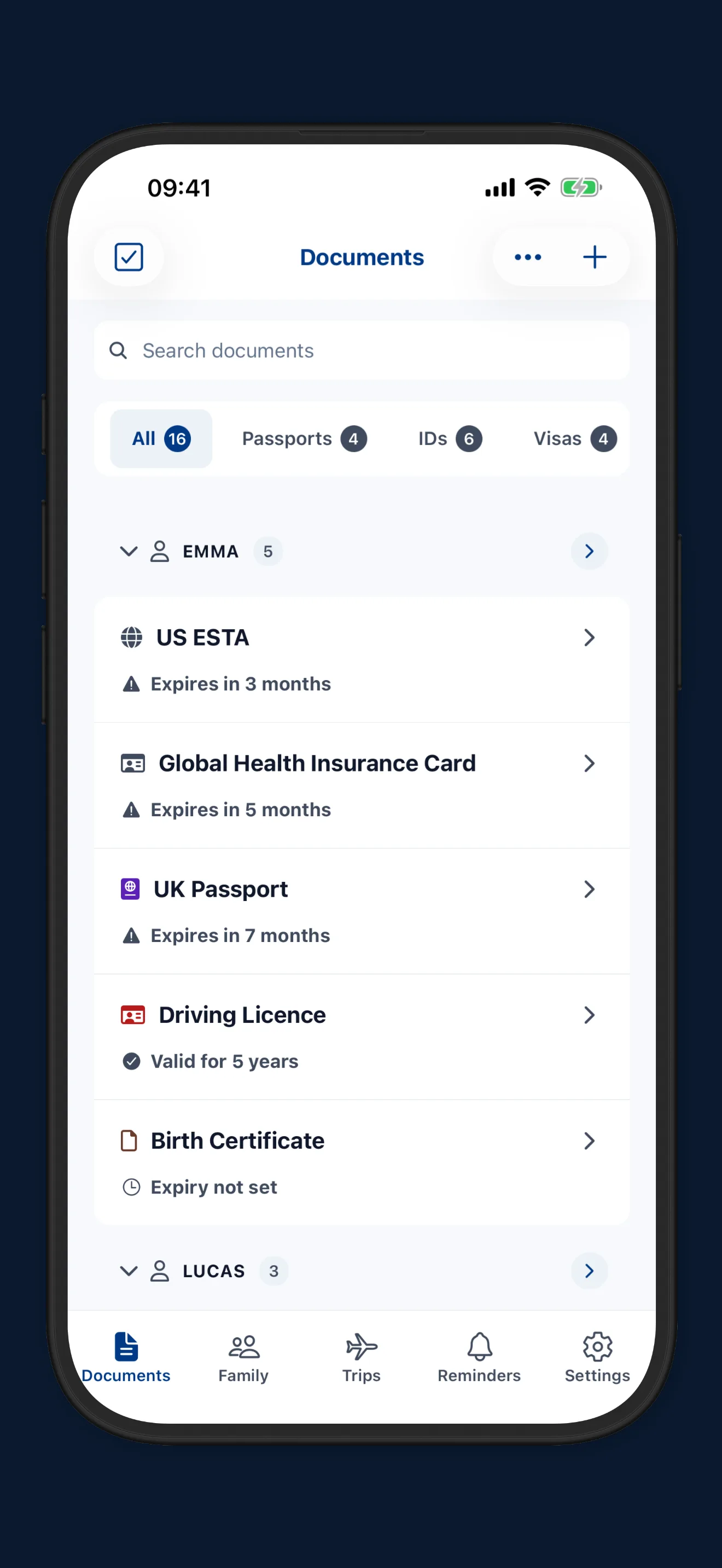
Passport. Visa. Driving licence. Insurance. Travel bookings. Kids' documents.
All in one place at your fingertips, ready when you need them.
If this is you: organised person who just needs one app to trust.
Where Your Documents Probably Live Now
Most of us already keep copies somewhere. Here's how to get more out of each one.
Camera Roll / Photos
Always with you. Put passport photos in their own album so you're not scrolling past holiday snaps at the check-in desk.
Cloud Storage
Handy across devices. Give travel documents one clearly named folder per person, and turn on the strongest sign-in protection your provider offers.
Password Managers
A sensible home for a passport number if you already use one. Keep the photo page just as easy to reach for the airport.
Note-Taking Apps
Flexible and familiar. If a passport number lives in a note, lock that note where your app allows it.
Spreadsheets
Good for putting the whole family's expiry dates in one table. Add a "renew by" column and you'll see the next deadline at a glance.
Paper Copies
Still worth having. A printed copy of each photo page, packed separately from the passports, helps if one goes missing abroad.
Your Vault at a Glance
Travel Document Vault stores documents and tracks expiry dates. Pro adds unlimited family profiles and trip planning.
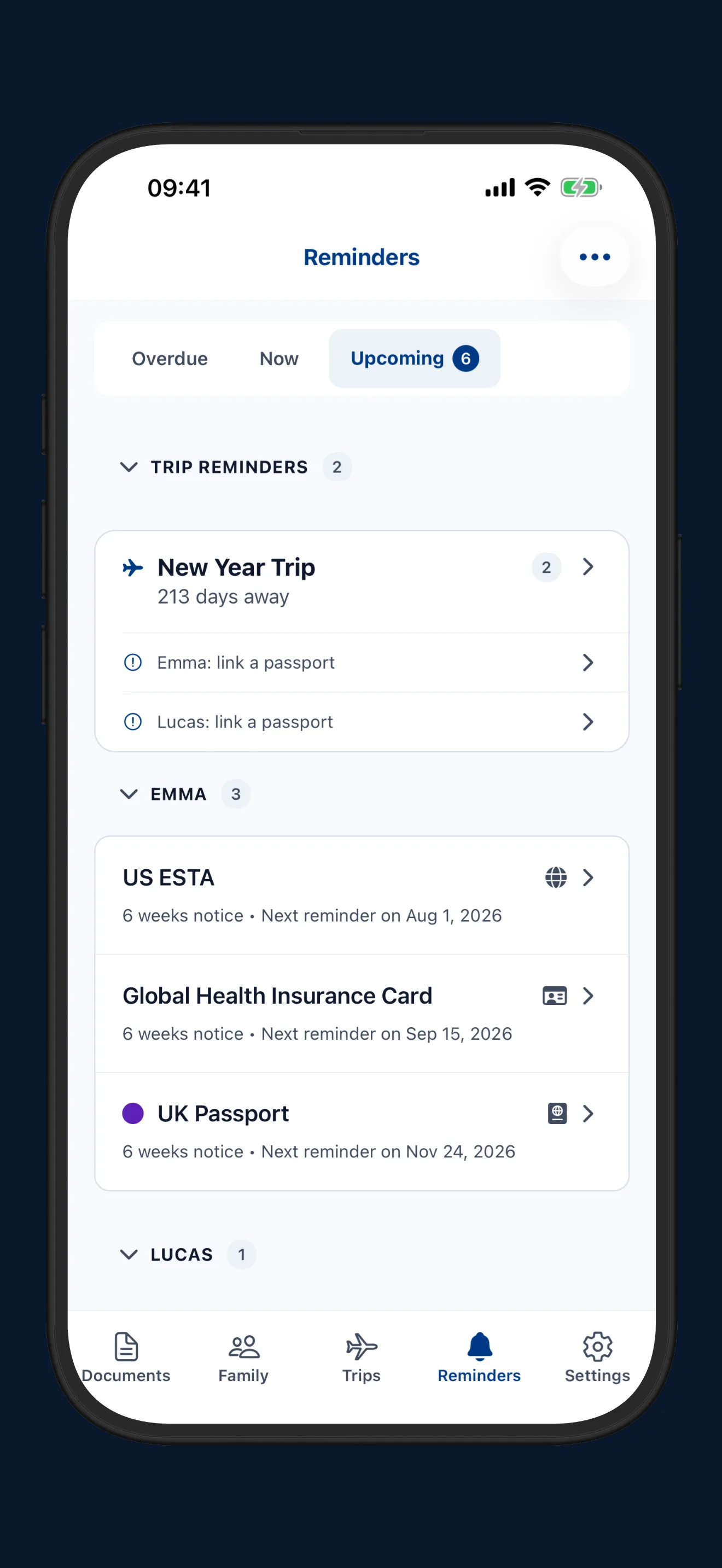
Expiry reminders
8 months
By default, passport reminders start this far ahead, then follow up as the date gets closer. Other documents are timed to their type.
- 8 mo
- 6 mo
- 3 mo
- 6 wk
- 1 mo
- 2 wk
- 1 wk
- Expiry
Encryption
AES-256
Document files are encrypted on your phone, and so is the database that holds your details.
App account
None
No sign-up and no login for the app. Optional cloud backup uses your own iCloud or Google account.
Offline
No signal
Saved documents and reminders work without a connection, even in the passport queue.
Pro
Pay once
A one-time purchase, no subscription.
With Pro
-
Unlimited family profiles
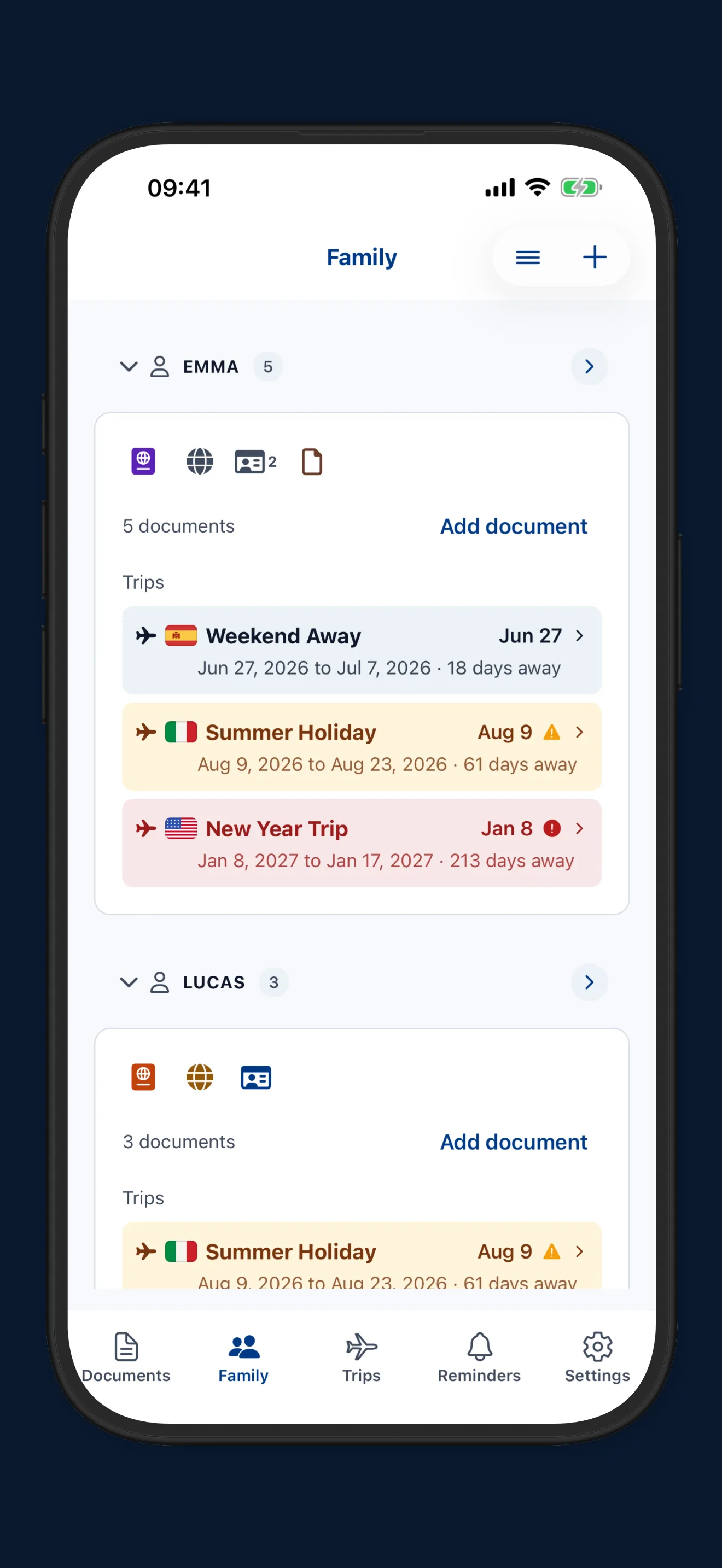
A profile for everyone in the family, each with their own documents.
-
No document limit
Add as many passports, visas and ID cards as the family needs.
-
Trip readiness checklist
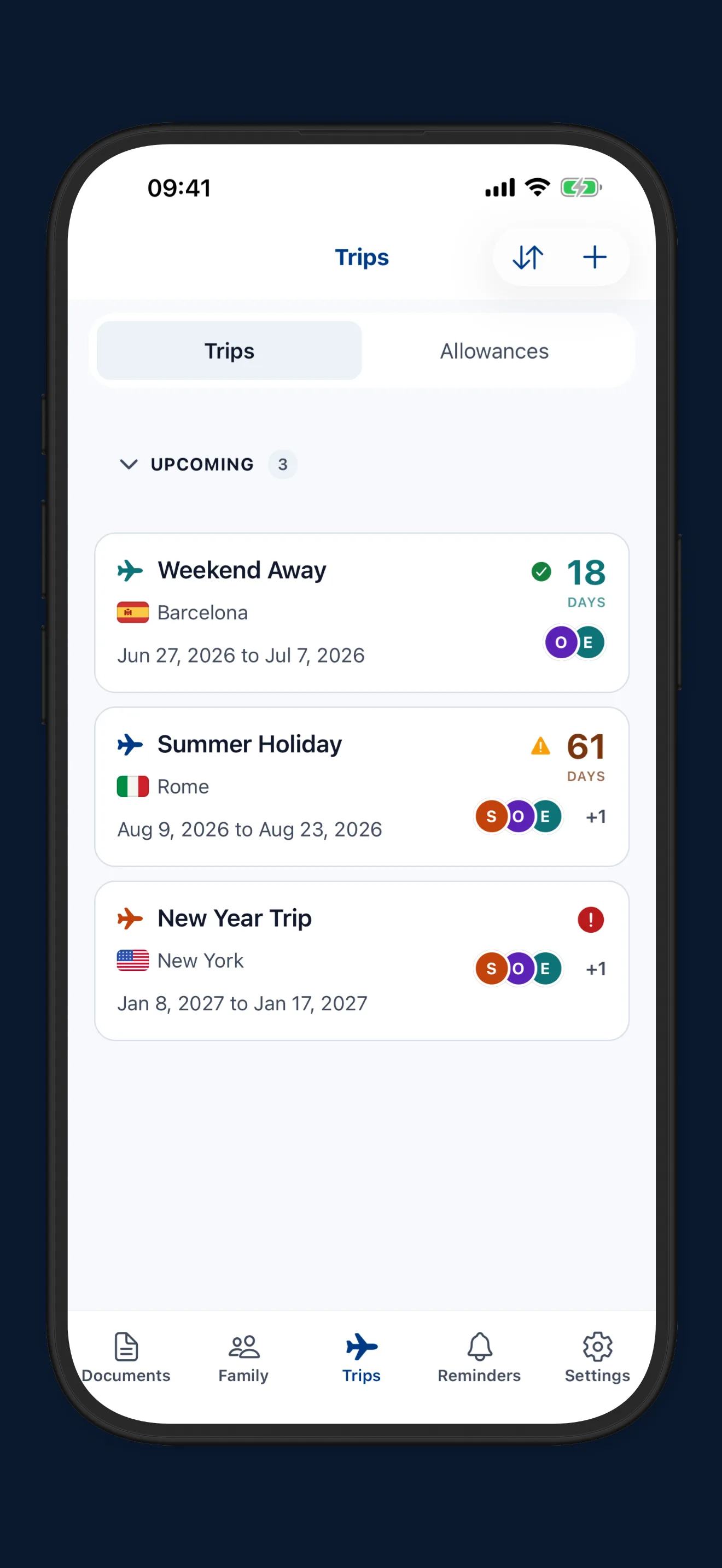
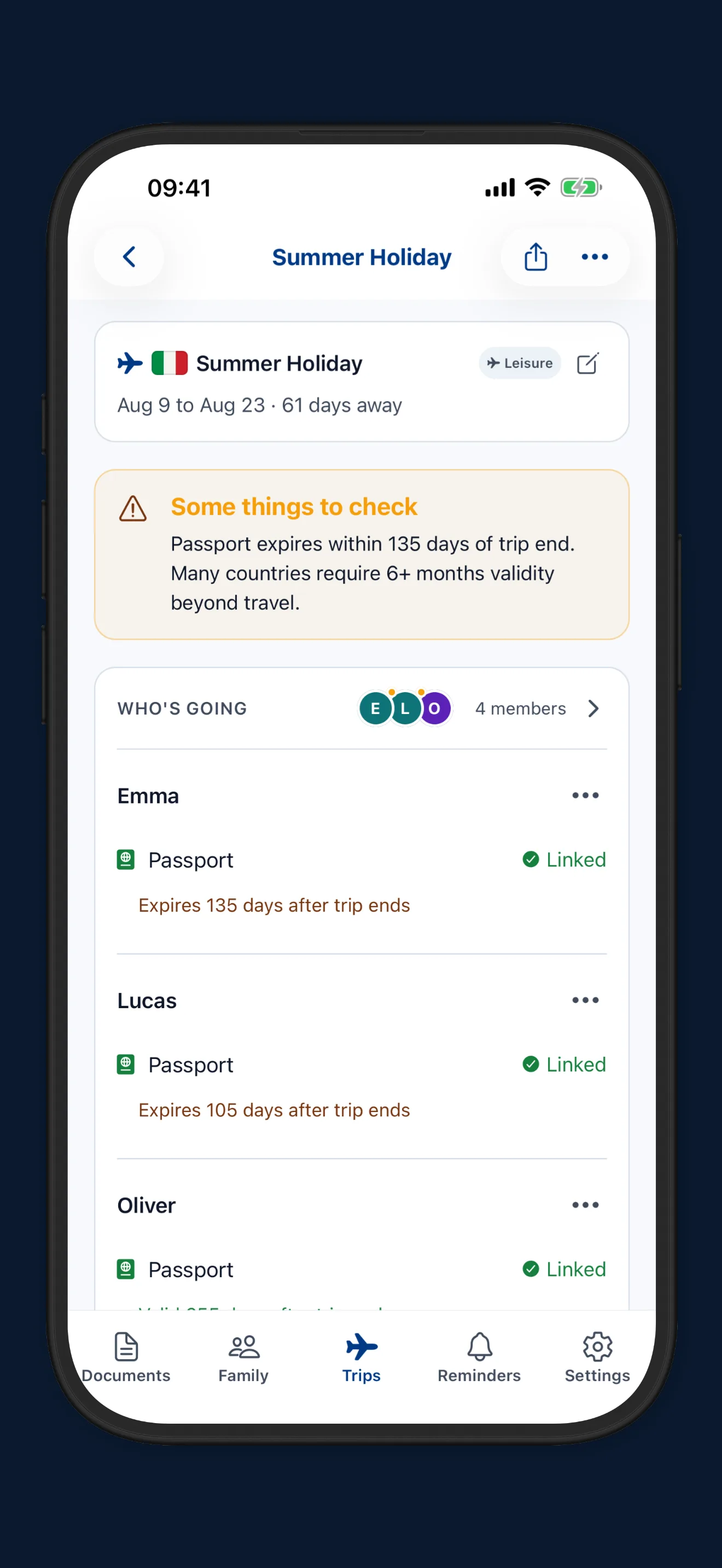
Plan a trip and see which documents are ready and what still needs doing.
-
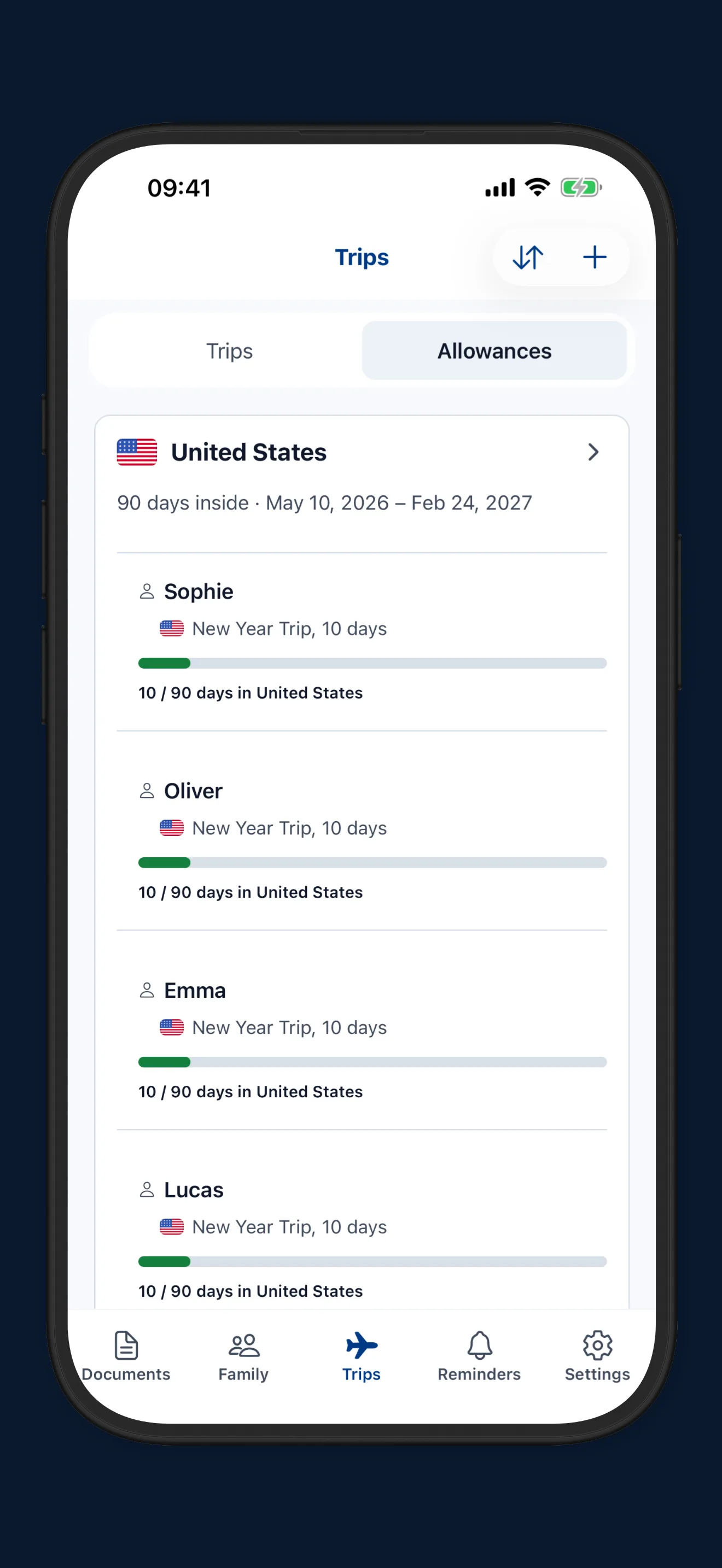
Day limits per country
Set a day limit yourself, and your trips count the days in or away against it.
-
Your own reminder timing
Choose how early reminders start for each document.
-
Encrypted cloud backup
An encrypted copy in your own iCloud (iOS) or Google Drive (Android), restored with your recovery code.
One App. Everything Organised.
Built by a parent who got tired of digging through Photos, email, and Drive before every trip. Now you don't have to.
Your Device. Your Documents. Nobody Else.
I chose to keep documents on your device by default. Optional Pro backup uses your own cloud account.
But would I trust a stranger's server with photos of my kids' passports? Never.
Encrypted on your device by default.
Cloud sync is off by default. If you turn it on (Pro), your vault is encrypted on your device before anything is uploaded, and goes to your own iCloud or Google Drive, sealed with a recovery code only you hold. No one, including us, Apple, or Google, can read it. The promise is enforced by code, not policy.
AES-256-GCM encryption at rest. Encrypted backups use PBKDF2 key derivation. Verify the architecture or read the full policy
Expiry Reminders, Months Ahead
Passport renewals take 6 to 8 weeks. Reminders start 8 months early and cascade down automatically.
Reminders arrive at 6 months, 3 months, 6 weeks, and expiry day - helping you stay ahead of renewal deadlines.
Works for passports, visas, licences, insurance, anything with an expiry date.
Family Passport Organiser, One Tap Away
You're the one who remembers which kid's passport expires first, whether the insurance covers everyone, and when visas need renewing.
With Pro, one profile per family member. One tap to see everything. Built for the person who carries it all.
Works Offline. Everywhere.
Spotty airport Wi-Fi? Foreign embassy with no signal? Airplane mode?
Documents saved locally are available offline. Local document viewing and reminders work offline; purchases, update checks and cloud features need internet.
Pay Once. No Subscription.
Start free. Store up to 5 documents with full reminders and encryption. Pro removes the document-count limit. Available space still depends on your device.
Pro is a one-time purchase of $9.99. Unlimited profiles and documents, no recurring charges, and no renewal date to forget.
Priced in US dollars. We set each country’s price locally rather than converting from dollars, and the App Store or Google Play shows yours before you pay.
Multi-page Support
With Pro, capture up to 10 pages for airline tickets, vouchers and other documents, including travel insurance policies.
Professional PDF Export
With Pro, combine multiple documents into a single PDF file for sharing with embassies, airlines, or for physical printing.
I made this because my own family needed it.
Built for Families
Modern features for modern travel.
Everyone Ready, At a Glance
ProFamily readiness traffic light. Check linked documents against saved trip dates (Pro).
Your Cloud. Your Key.
ProEnd-to-end encrypted backup to your iCloud or Google Drive.
Track Days Out of Country
ProLog days spent in any country. Set custom day-limit targets and stay on top of visa duration rules.
Custom Country Day-Limits
ProSet day-limit rules per country per member.
30-Day Undo
Accidentally deleted. Recover within 30 days.
Every Family Member
ProSeparate profiles. Each person's documents organised on their own.
Start free. Upgrade anytime.
Three Steps. That's It.
Scan. Set. Forget.
Scan or Import
Open the camera, use the guided overlay, and capture your document. Or import an existing one from your photo library.
The app reads the expiry date when it can - you confirm it or type it in.
Set the Expiry and Forget
The app schedules cascading reminders automatically.
Passports start eight months out. IDs, visas, insurance and other documents start three months out, with reminders through expiry day and afterwards.
Always Ready When You Need It
At immigration, filling forms, applying for visas. Your documents are organised, searchable, and always on your phone.
Built for Travellers
Store document copies and expiry dates in one place, with reminders on by default.
- Families: With Pro, manage multiple profiles for children and spouses in one place. Carry the mental load for the whole household without switching between folders.
- Digital Nomads & Expats: Track residency permits, local IDs, and work visas alongside passports as you move between countries.
- The 6-Month Rule: Passport reminders start eight months before expiry by default. Check your destination's entry requirements separately.
- Future-Ready: Stay organised amidst upcoming EU administrative changes like EES and ETIAS. Ensure your documents are prepared before the rules shift.
- Privacy-conscious individuals: No third-party servers ever hold your readable data. Optional backup goes to your own iCloud or Google Drive, sealed with a key only you hold.
- Budget-aware purchasers: Avoid subscriptions. Pay a simple, one-time fee rather than renting your own data.
Quick Answers
The questions we hear most often.
What happens if I lose my phone?
Does it work without internet?
Is my data really safe?
Is it really a one-time purchase?
* For v1.x. See Pricing Policy.
Can I use it for more than passports?
Important: Travel Document Vault is a personal organisation tool for storing digital copies of your documents. Digital copies stored in this app are NOT valid for travel. It does not verify document authenticity or provide legal or travel advice. Always carry original documents and verify all travel requirements with official government sources.
Your Family. Protected. Always.
Everything in one place. No accounts, no subscriptions, no surprises.