Every document, one screen
Is everything actually in here?
Passports, visas, government ID, travel insurance and more: saved, encrypted, on your phone, with every expiry date in plain sight.
Where to keep passport scans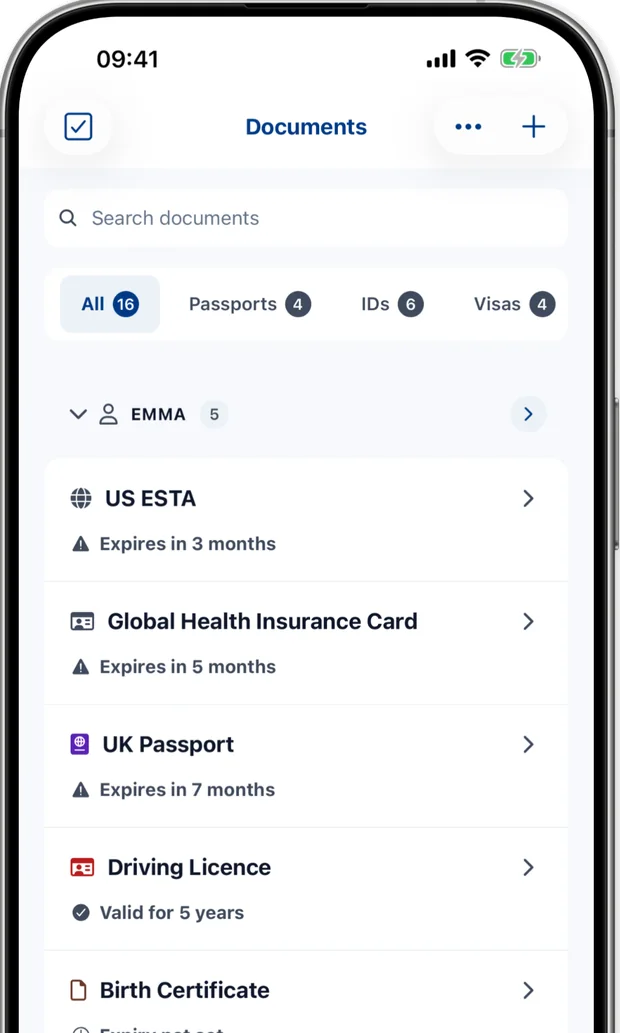
Know every passport is in date before you fly.
Travel Document Vault keeps your passports, visas and IDs on your phone and reminds you before they expire. Add the whole family with Pro.


Free to start · One-time purchase for Pro · No subscription
Before the real trip there's this one, the one you take in your head, checking things you've already checked.
Let's do it properly. Ten minutes, starting now.
Is everything actually in here?
Passports, visas, government ID, travel insurance and more: saved, encrypted, on your phone, with every expiry date in plain sight.
Where to keep passport scans It isn't always just my passport.
With Pro, file each under a person, or attach it to a trip. Each section shows what they hold and where they're going.
Managing a family's passports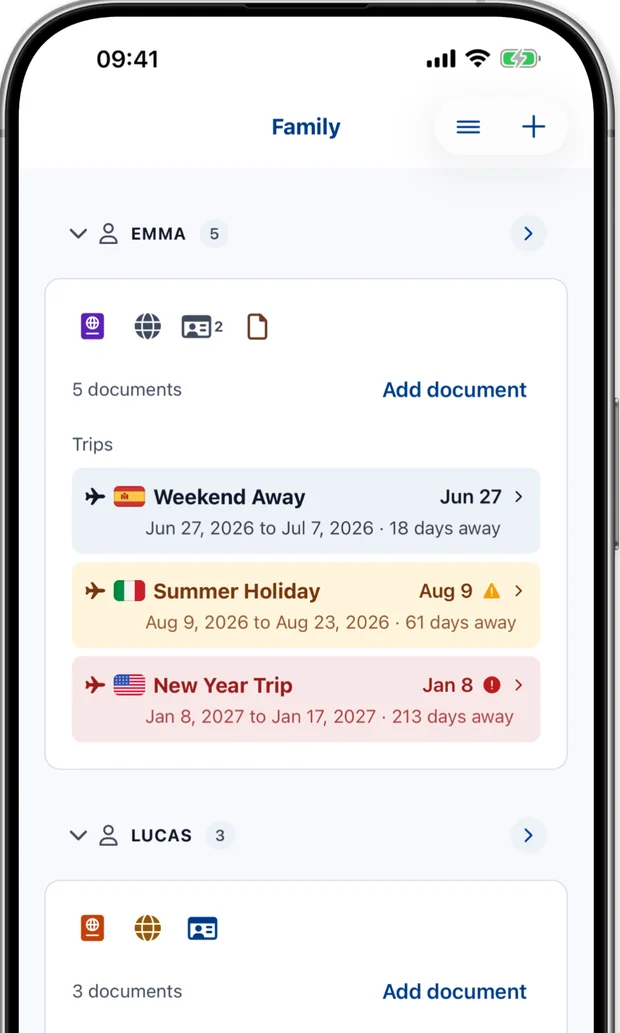
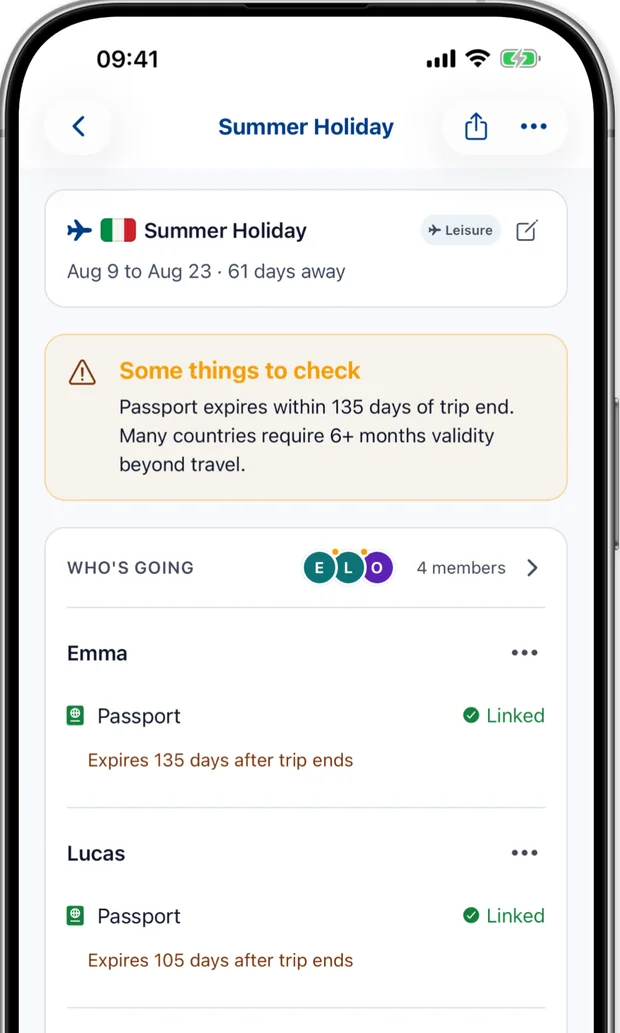
Amber. What did I miss?
Many countries want six months beyond the trip. With Pro, the app checks linked passports against saved trip dates using a default 180-day buffer after the trip ends. Check your destination's actual rule separately. Borders decide what they accept; better to know now than at the check-in desk.
The six-month rule, country by countryAn officer once told me my daughter's passport had seven months left. Seven months felt like plenty. Why I built this
I'd have set one. Eventually.
Save an expiry date and the app schedules reminders automatically. They are on by default, and you can see the next scheduled reminder.
How long renewal actually takes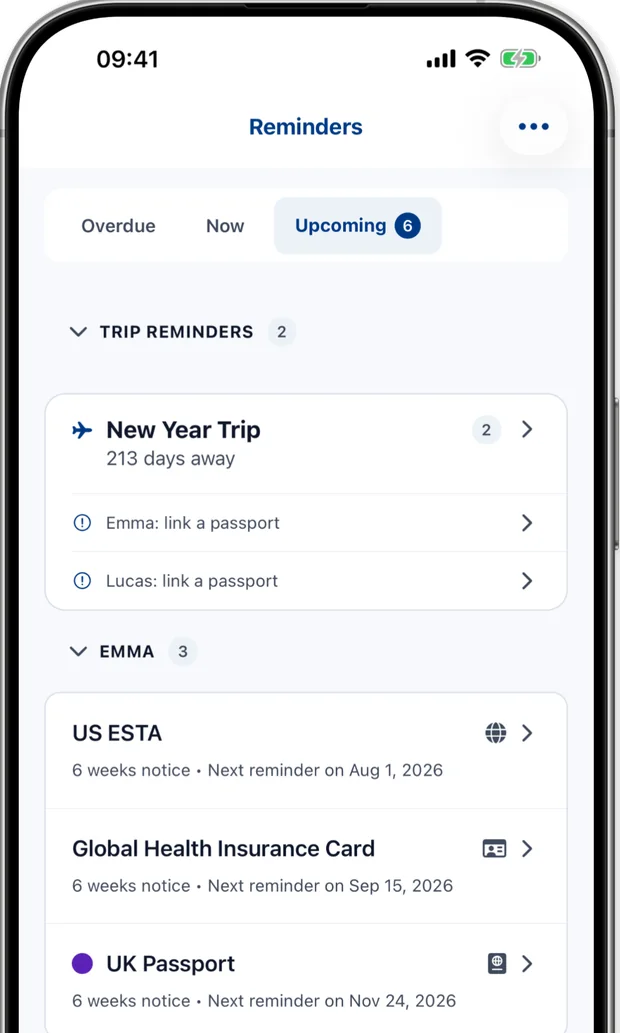
How many days have we used?
Some countries cap how long you can stay in a rolling window. With Pro, set the limit; the app counts every trip to that country against it.
Counting your 90 days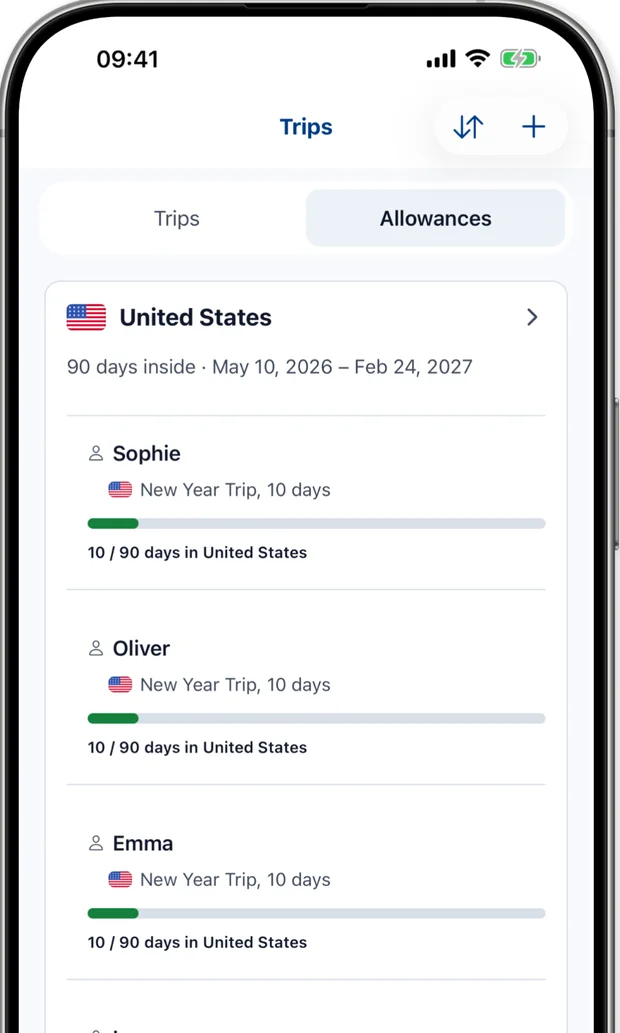
With Pro, green, amber, red down the list. Ten minutes, and the checklist you've carried alone is out of your head.
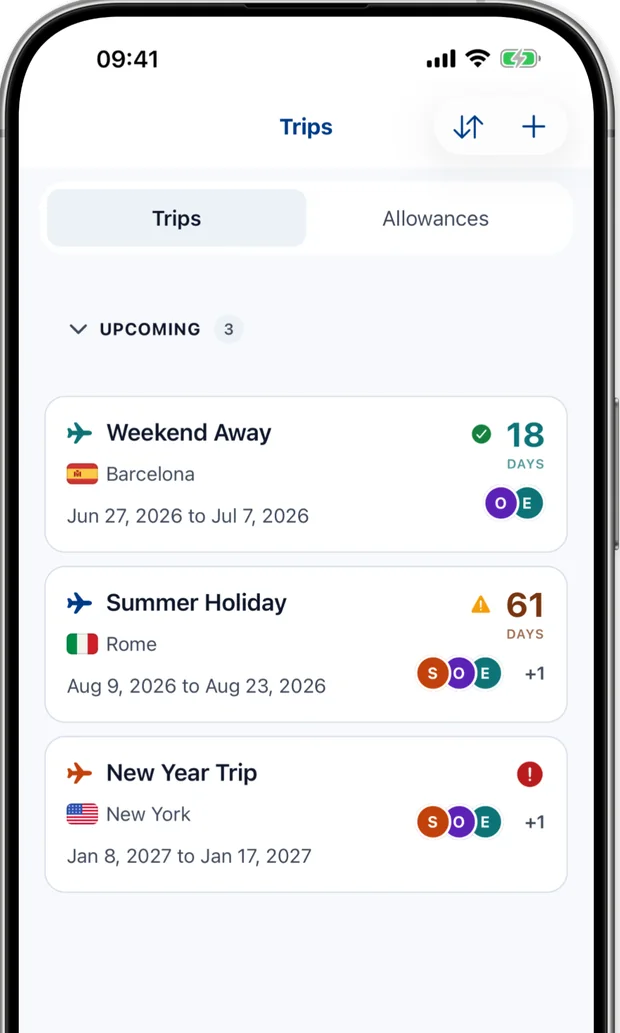
Nobody sees this work. Now it has a place to live, this trip and every one after.
One less thing to worry about.


Built by a parent who needed it. Your saved documents are encrypted on your device. Optional backup goes to your own iCloud or Google Drive, sealed with a recovery code only you hold.
I built this app because I needed it for my own family. It has automatic expiry reminders months before renewal becomes urgent and, with Pro, separate profiles for every family member. There's no VC funding pushing me to sell your data and no roadmap driven by growth metrics; it's simply a tool that solves one problem, properly.
The safest server for passport scans is no server at all, which is why the app keeps documents on your device and works fully offline by default. If you turn on backup, your encrypted vault goes to your own iCloud or Google Drive, sealed with a recovery code only you hold.
Documents are encrypted on your device with AES-256-GCM, using keys held in your device's secure key storage. That's strong, modern encryption - and you should still protect your phone with a strong passcode and App Lock.
Vault Export and Import are free. Pro adds encrypted cloud backup to your own iCloud or Google Drive. Restore with your recovery code on a compatible phone on the same platform, using the same cloud account. We do not hold your code.
Passports start warning you eight months out, then step down - six months, three, six weeks, one month - to expiry day. Reminders are on by default when you save an expiry date. IDs, visas, insurance and other documents start three months out.
With Pro, the app checks linked passports against your trip dates with a default 180-day buffer after the trip ends. Check your destination's actual rule separately.
Here's an honest accounting of every piece of data in this app.
Your passport scans
On your device. With optional backup on, sealed in your own cloud before upload. I cannot see them either way.
Your document details
Expiry dates, issuing countries, titles and notes. On your device; copies can leave if you share or export them, or turn on encrypted cloud backup (Pro).
Your family profiles
Never transmitted to me. There's no Travel Document Vault server for them to reach.
Reminder notifications
Scheduled locally on your device. I don't know your expiry dates.
No Travel Document Vault server stores your documents. There's nothing to find.
Built for families who travel everywhere.
Family readiness traffic light. See which linked documents need attention against your saved trip dates.
Encrypted backup to your iCloud or Google Drive. You hold the recovery code. We never see it.
Log days spent in any country per family member. Compare your saved trip days with the country day limits you enter.
Add a profile for every family member. Free includes 1 profile. Pro adds unlimited family profiles.
Built for families who travel. Essential for keeping track of every vital document, from insurance policies to work badges.
Passport alerts start 8 months out
Guides to frame passports and IDs
Combine documents into one PDF for printing
Available in over 40 languages
You're the one who remembers everything. That burden doesn't have to sit entirely on you. With Pro, organise spouses, kids, and grandparents in one safe place.
We watch the dates so you don't have to. Get gentle nudges months in advance, so renewal is a checklist item, not an emergency.
Streamlined capture. Our guides help you get a crisp, clear shot in seconds, so every number and face is readable.
Passports, licences, insurance. Securely stored, strictly private, and tracked for expiry. One place for everything that matters.
Available in over 40 languages. The app feels native wherever you are.
English, Español, Français, Deutsch, Italiano, Português (BR), Português (PT), Русский, 中文 (简体), 中文 (繁體), 日本語, 한국어, Nederlands, Polski, Türkçe, Indonesia, Tiếng Việt, ไทย, Українська, Svenska, Norsk, Dansk, Suomi
The app tries to read the expiry date on your device. Confirm the date it finds or type it in before saving.
Your document files stay on your phone unless you share or export them, or turn on encrypted backup (Pro). There's no cloud server of ours involved and nobody looking over your shoulder.
Spotty airport Wi-Fi? No problem. Your documents are right there on your screen, whichever country you're in. Works fully offline in airplane mode.
We don't want your data. We don't sell ads. We just want to help you travel better.
One-time purchase. No subscriptions. No hidden fees. No data harvesting.
Save on your device. Share, export or use Pro cloud backup.
For your whole family. Pay once. All v1.x updates included, forever.
USD. Your country’s price is set locally rather than converted from dollars, and the store shows it before you pay.
Everything you need for solo travel
Save on your device. Share, export or use Pro cloud backup.
Unlock the full vault for your family
USD. Your country’s price is set locally rather than converted from dollars, and the App Store or Google Play shows it before you pay.
Everything in Free, plus:
Restore purchases anytime with the App Store or Google Play account you bought with.
Important: Travel Document Vault is a personal organization tool for storing digital copies of your documents. Digital copies stored in this app are NOT valid for travel. It does not verify document authenticity or provide legal or travel advice. Always carry original documents and verify all travel requirements with official government sources.
Set it up tonight. Let the app remember so you don't have to.